This is the main reference guide for everything available on BestDates. Whether you've just created a BestDates sign-up or you've been on the platform for a while, it covers all the tools and what you need to know.
Most of the questions members have follow the same pattern: how do I find people here? What's the easiest way to start talking to someone? What can I send in a message? How do I stay safe? And what can I do for free versus what costs money?
We built this guide to answer all of those in one place, walking through each feature from the perspective of the situation it was designed for. If you've been wondering how something works on BestDates, or whether a tool exists for something you want to do, the answer is probably here.
How Do I Find People on BestDates?
One of the first things you run into on any communication platform is the same question: where do I even start? The BestDates dating site offers three ways to find people, each suited to different situations depending on what you're looking for.
Search
If you have a clear sense of who you want to connect with (a particular country, a certain age range, or a specific gender), Search is where to start. You can filter results by country, age, and gender, and choose to see all profiles, only members who are currently online, or only followed members.
People Carousel
Not everyone arrives on a platform with a fixed idea of who they're looking for. Sometimes you want to browse and see who comes up. The People Carousel on BestDates shows a rotating selection of suggested profiles. You can like or save a profile directly from the carousel without opening it, making it a low-effort way to signal interest while you're still exploring.
Newsfeed
The BestDates Newsfeed is built around a different idea: that the best way to find people you'll actually connect with is through what they share. Following someone adds their posts to your feed, and the Newsfeed is also a good way to discover new members based on what they share, rather than just their profile.
How Can I Show Interest in Someone?
You've found someone interesting, but you're not sure how to make the first move. BestDates offers several ways to signal interest, and they'll appear at different points depending on where you are on the platform.
Like: when you're browsing the People Carousel, a heart icon lets you like a profile with one tap. The other member is notified that you've shown interest, which may prompt them to visit your profile in return. No pressure on either side.
Wink: when you visit someone's profile for the first time, you'll see two options: Wink, or Say hello. A Wink is a one-time gesture that says "I noticed you" without committing to a message.
Say hello: appears alongside Wink on the chat. Tapping it sends a ready-made opening message. It's the quickest route from interest to conversation.
Follow: this one isn't about a single moment; it is about staying connected over time. Following a member means their BestDates online posts keep appearing for you, even if a conversation hasn't started yet.
|
|
Like |
Wink |
Say hello |
Follow |
|
What it does |
Signals interest |
A light nudge |
Sends a ready-made opener |
Subscribes to their posts |
|
Free or paid |
Free |
Free |
Paid |
Free |
|
Starts a chat? |
No |
No |
Yes |
No |
How Do I Start a Conversation on the BestDates Website?
Starting a conversation with someone you've never met is the part most people find the hardest. We designed three ways to make it easier, depending on how much control you want over what you say and how many people you want to reach at once.
Icebreakers
Icebreakers are pre-written conversation starters designed for one specific situation: when you want to reach out to several people at once without writing a different opening line for each one. You pick a message, choose between 2 and 5 members to send it to, and hit send. The same message goes to all of them at once, starting multiple conversations in a few clicks.
To send an icebreaker:
-
Find the icebreaker option and select it.
-
Pick a message from the available options.
-
Choose between 2 and 5 members to send it to.
-
Send.
Icebreakers are a paid feature on BestDates. There is no limit on how many icebreakers BestDates members can receive.
Opening Line Templates
When you start a chat with another member, you will see a selection of pre-written opening lines in the message box. These are short, question-style prompts on BestDates designed to invite a reply (for example: "What is your hobby?"). You can tap one to send it as your first message instead of writing from scratch.
You can also save a personal template, so a go-to opener is always available when starting a new conversation. Template messages on BestDates are charged the same as other chat messages.
Writing Your Own First Message
For something more personal, typing a message directly is always an option. Referencing something from the other person's profile or a recent post tends to get a stronger response than something generic.
For advice on what to share and how to communicate safely from the start, read our guide: Safe Communication Habits on BestDates: What to Share and When.
Which Messaging Options Do I Have?
Not every conversation is the same. Sometimes a quick exchange is exactly right. Other times you want to write something more considered, or share a photo alongside your message. We built two distinct messaging formats on BestDates to handle both.
Chat is live, short-form messaging that lets a conversation develop at a natural pace. It's the format most conversations start in and stay in.
Mail is for when you have more to say. Mail messages are longer and support photo attachments, making them better suited to more detailed correspondence or when you want to share something visual as part of the message itself.
Drafts are there for when you start a message but don't finish it. BestDates saves it automatically, so you can come back to it later without losing what you wrote.
Chat Translation is available to some members and translates incoming and outgoing messages as they arrive. It is designed for conversations on BestDates where language might otherwise be a barrier. Each translated message is clearly marked as a translation, and you can tap to view the original text at any time. If a translation seems off, you can flag it directly.
How Do I Share Photos and Stickers?
Sometimes a conversation reaches a point where showing is better than describing, or you just want to add a little lightness to an exchange. We have two features for that.
Photo sharing lets you send images directly inside an active chat. Whether it's something you cooked, a place you visited, or anything easier to show than explain, you can share it. Photos shared in chat are separate from profile albums.
Stickers are expressive graphics you can add to any message. They're there for the moments when a well-chosen image says something faster and more accurately than typing it out.
Both photo sharing and stickers are paid features on BestDates.
Is BestDates Safe to Use?
Your sense of security on BestDates matters as much as any other part of the experience. We have built several tools for different situations: whether you want to understand who you're talking to, stop contact from someone, flag something for our team, or take a step back from the platform entirely.
Verification Badge
Wondering whether the person on the other side of a conversation is who they say they are is a common concern. The verification badge is our response to it. It's optional and available to any BestDates member in your account settings.
To get verified:
-
Go to your BestDates account settings and find the verification option.
-
Have a valid, unexpired government-issued ID ready, along with a device with a working camera and good lighting.
-
Submit a clear photo of your ID.
-
Take a live selfie. Our third-party partner matches it against your ID to confirm a match.
-
If the check passes, the badge appears on your profile.
Most members complete the verification process on their first attempt on BestDates. For a full explanation of how the system works, read our guide on identity verification on BestDates.
Block and Report
If a conversation takes an unwanted turn or someone's behavior crosses a line, you have two tools that work independently of each other.
To block a member:
-
Open their profile or your conversation with them.
-
Select the block option.
-
The block takes effect immediately: they can no longer message you or view your profile.
To report a member:
-
Open their profile, a message, or a post they've shared.
-
Select the Report Abuse option (it's available on every profile on the BestDates website).
-
Choose the category that best describes the issue and add any details that might help.
-
Submit. Our moderation team reviews all reports.
You don't need to block someone to report them, and you don't need to report someone to block them. The two tools are independent.
Account Management
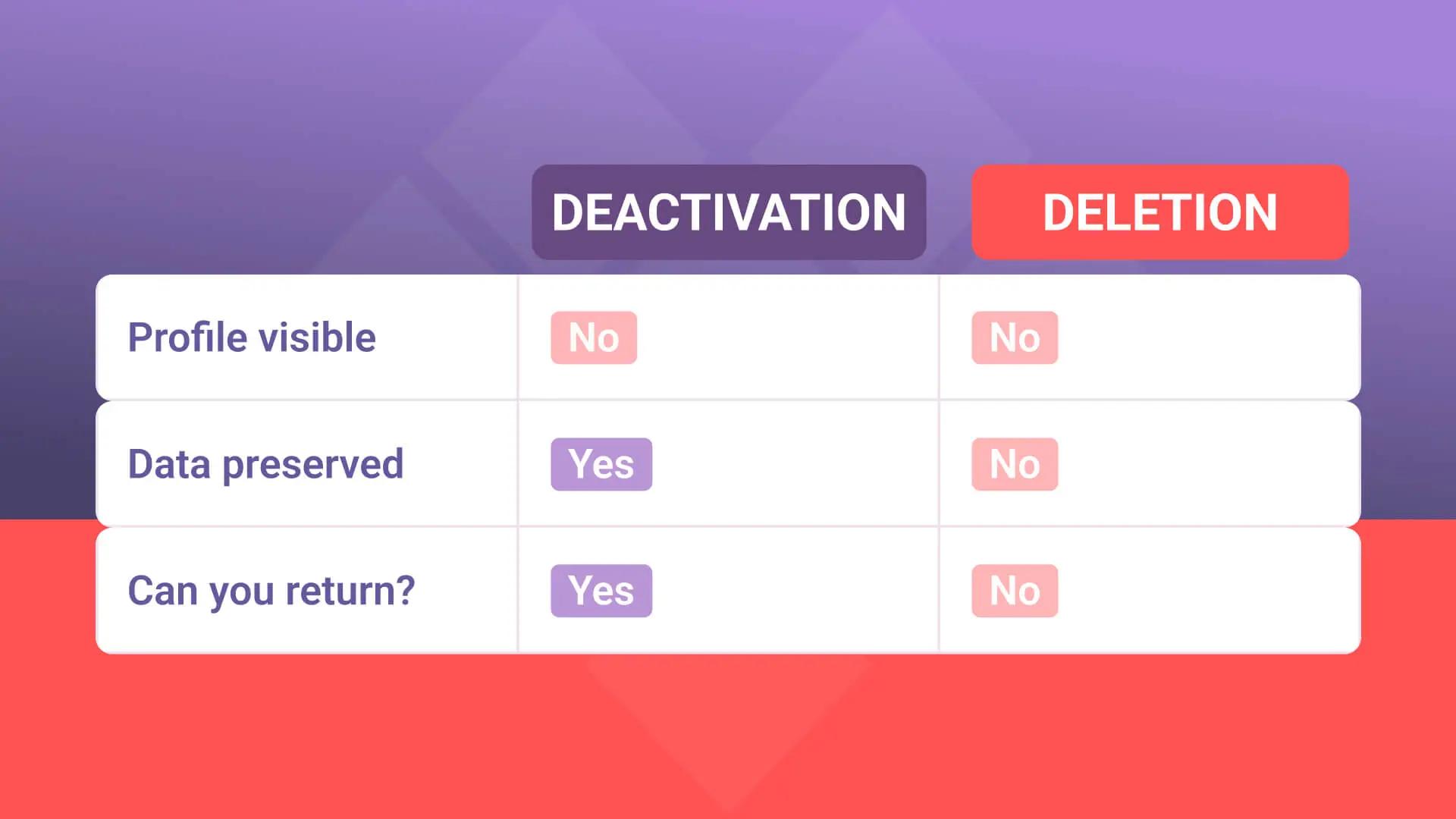
Deactivating your account is the option for a break without leaving permanently. Your profile is hidden, notifications stop, and your data stays intact. You can return simply by logging back in. Deletion removes all data from our servers and cannot be undone.
BestDates Cost: How It Works
For anyone looking for a clear BestDates cost breakdown, the first thing worth knowing is that there is no BestDates subscription. The platform does not charge a recurring fee — instead, it operates on a feature-by-feature basis, meaning you pay only for the specific features you choose to use.
It is free to create your account and explore the platform — there is no need to commit until you are ready to use the messaging features. When you are, chat, mail, photo sharing, stickers, and icebreakers are subject to a fee. The table below shows the full breakdown.
|
Free |
Paid |
|
Registration and account creation |
Chat |
|
Browsing profiles and Search |
|
|
People Carousel |
Photo sharing |
|
Newsfeed |
Stickers |
|
Like, Wink, and Follow |
Icebreakers |
|
Verification badge |
|
|
Block and Report |
|
Get the Most Out of BestDates
That BestDates guide covers every feature currently available on the platform. Each one is built for a different moment — finding people, making a first move, keeping a conversation going, or knowing what to do when something feels off. The platform is designed to work at your own pace, with no pressure to move faster than you're comfortable with.
If a feature isn't working the way you'd expect, or you have a question not covered here, the BestDates support team is available at [email protected] — initial responses typically arrive within 24 hours. You can also find help articles in the Safety Center on the BestDates website.
Creating an account is free, and everything you need to browse profiles and explore the platform comes with it. Register now on BestDates.com and start browsing.